Why HubSpot Company Enrichment Matters
Every business relies on HubSpot to store the companies they interact with—but the quality of that data is often far from ideal. Company names vary, registration numbers are missing, financials are outdated or unavailable, and ownership structures are almost never captured correctly. Over time, these gaps create a CRM filled with duplicates, incomplete profiles, and unreliable information that slows down sales, weakens marketing targeting, and increases compliance risk.
The easiest way to fix this is by enriching HubSpot with official, registry-verified company data.
The Global Database Intelligence Enrichment app—available directly in the HubSpot Marketplace—lets you do exactly that. It automatically enriches your CRM with accurate company identifiers, financial statements, UBOs, shareholders, and full corporate group structures. And importantly, it allows you to get started for free.
With the app installed, HubSpot users can:
Automatically enrich new leads as soon as they enter the CRM
Complete and clean existing records that contain missing or outdated data
Receive alerts when financials, ownership, or group structure changes
Remove duplicates by matching companies via registration number, VAT, or EIN
Understand the true financial health and ownership background of every company
Identify hidden opportunities by exploring parent companies and subsidiaries
Instead of relying on scattered information found online, your CRM becomes a single source of truth, powered by the same data companies file with their official government registries.
This article walks through why registry data is so important inside HubSpot, what information you can enrich for free, and how you can use it to improve qualification, segmentation, compliance, and overall CRM performance.
2. Before and After Enrichment: How Your CRM Changes
Most CRMs look healthy on the surface, but underneath they suffer from the same structural weaknesses: incomplete records, duplicated companies, inconsistent naming, unreliable firmographics, and little visibility into ownership or group structure. These issues slow down sales, confuse marketing, weaken account planning, and introduce risk for compliance.
Enrichment with verified registry data turns HubSpot from a basic contact database into a strategic intelligence system.
Below is the difference your team will experience the moment enrichment is activated.
2.1 Quick Overview: The Transformation at a Glance
CRM Dimension | Before Enrichment | After Enrichment |
|---|---|---|
Lead Qualification | Guesswork, manual research, inconsistent data | Instant validation, complete profiles, higher accuracy |
Company Identity | Multiple versions of the same company; no registration data | Verified legal entity with registration number, VAT, legal form |
Data Quality | Incomplete fields, duplicates, outdated entries | Clean, standardized, registry-verified records |
Ownership & UBOs | Very limited visibility | Clear shareholders, owners, and control structure |
Group Structure | No context on parent or subsidiaries | Full corporate hierarchy inside HubSpot |
Financial Insight | Missing or estimated financials | Official filings and financial indicators (when available) |
Segmentation | Generic, broad, often inaccurate | ICP-precise filters powered by verified data |
Compliance | Manual checks, time-consuming | Built-in KYB foundation from official registries |
Sales Planning | Reps talk to the wrong entity or low-value subsidiaries | Clear view of the real buyer and group-wide opportunity |
Reporting | Data inconsistencies break dashboards | Reliable metrics and uniform data across markets |
This transformation happens without replacing your existing CRM processes — enrichment simply strengthens the foundation you already have.
2.2 Before Enrichment: The Common Problems Inside HubSpot
Even well-managed CRMs suffer from hidden data issues. Before enrichment, your team typically faces:
→ Multiple versions of the same company
Example:
American Express, Amex, American Express PLC, AMEX Group Ltd.
All treated as different records.
→ No verified company identity
Missing:
registration numbers
VAT/TIN/EIN
legal forms
incorporation dates
official names
This damages segmentation and ICP accuracy.
→ Inactive or dissolved companies
Your team continues working with companies that have been legally closed — wasting time and harming reporting accuracy.
→ No visibility into ownership or shareholders
Sales and compliance teams have no clarity on:
who owns the company
whether the entity in CRM is the parent, branch, or subsidiary
whether the real decision-maker sits elsewhere in the group
→ No group structure context
HubSpot shows isolated companies, not the family they belong to.
→ No financial indicators
Reps and CS teams have no visibility into stability or growth.
→ Broad, unfocused segmentation
Marketing wastes spend on companies that never match the ICP.
These issues are not minor — they directly slow down revenue operations.
2.3 After Enrichment: How HubSpot Becomes a Strategic System
Once enrichment is active, your CRM transforms into a platform powered by official registry data, giving every team new capabilities.
→ Each company becomes a complete, verified entity
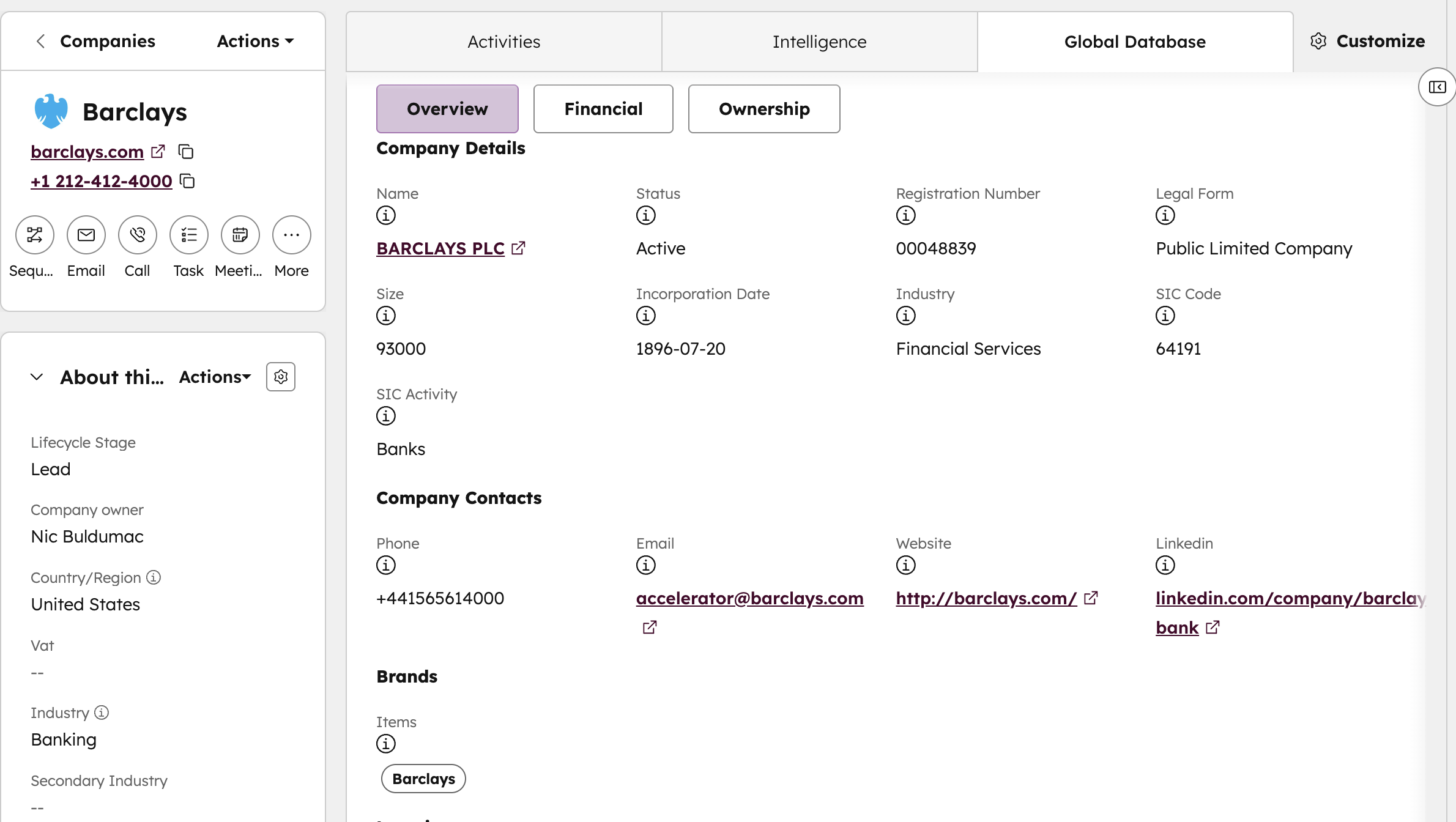 Every record receives:
legal name
registration number
VAT/EIN
legal form
industry classification
activity status
HubSpot becomes a source of truth — not a collection of guesses.
→ You eliminate duplicates with confidence
Because each enriched record has a unique registry ID, RevOps can merge duplicates with zero uncertainty.
→ Ownership and shareholders become transparent
Sales and compliance teams immediately see:
direct owners
indirect owners
UBOs
share percentages
controlling entities
This is essential for enterprise selling and risk checks.
→ Corporate groups become visible
The app reveals:
parent companies
subsidiaries
sister entities
cross-border structures
Sales can instantly identify:
where bigger opportunities exist
which leads are connected
where to escalate conversations
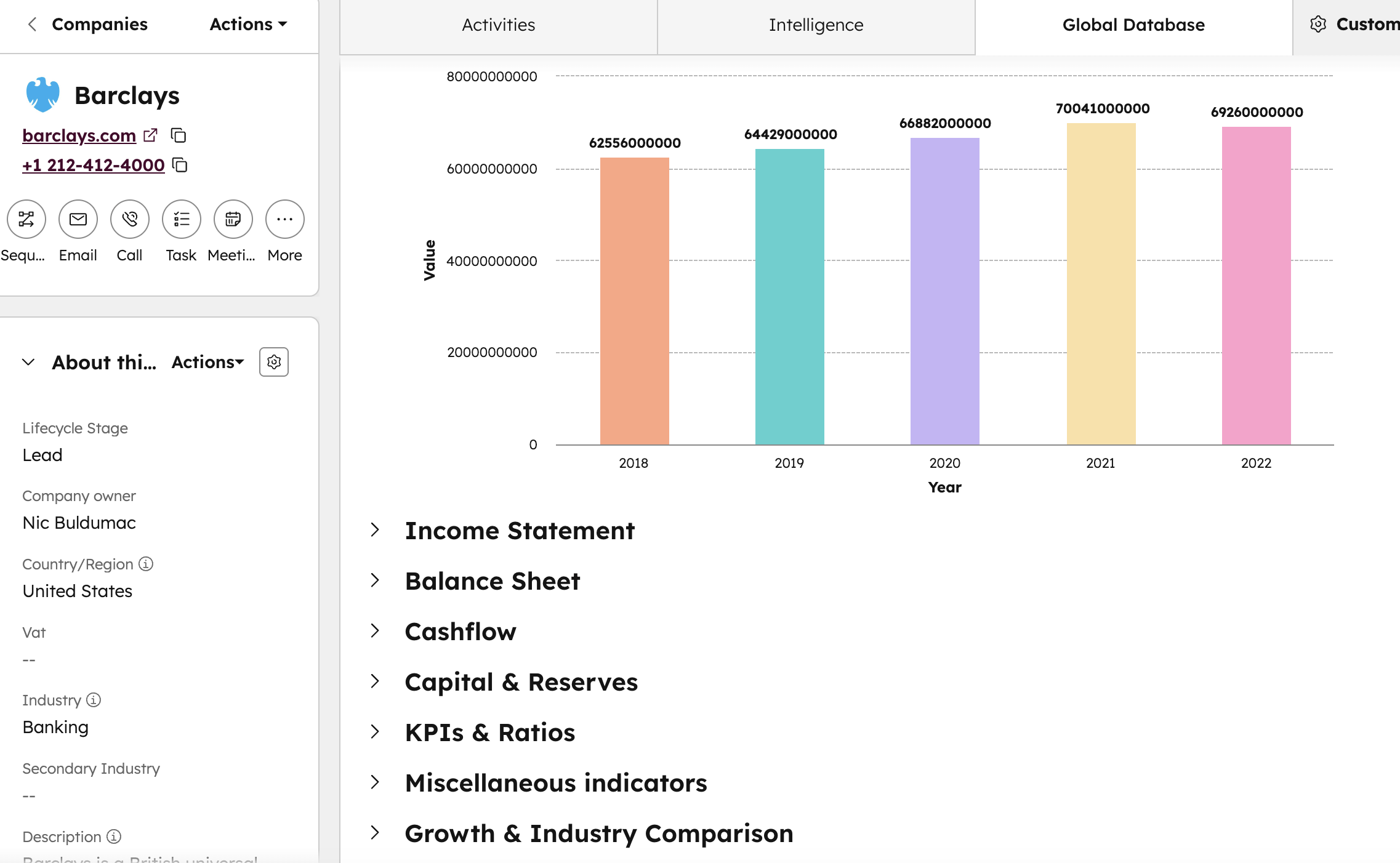
→ Financial intelligence becomes part of the CRM
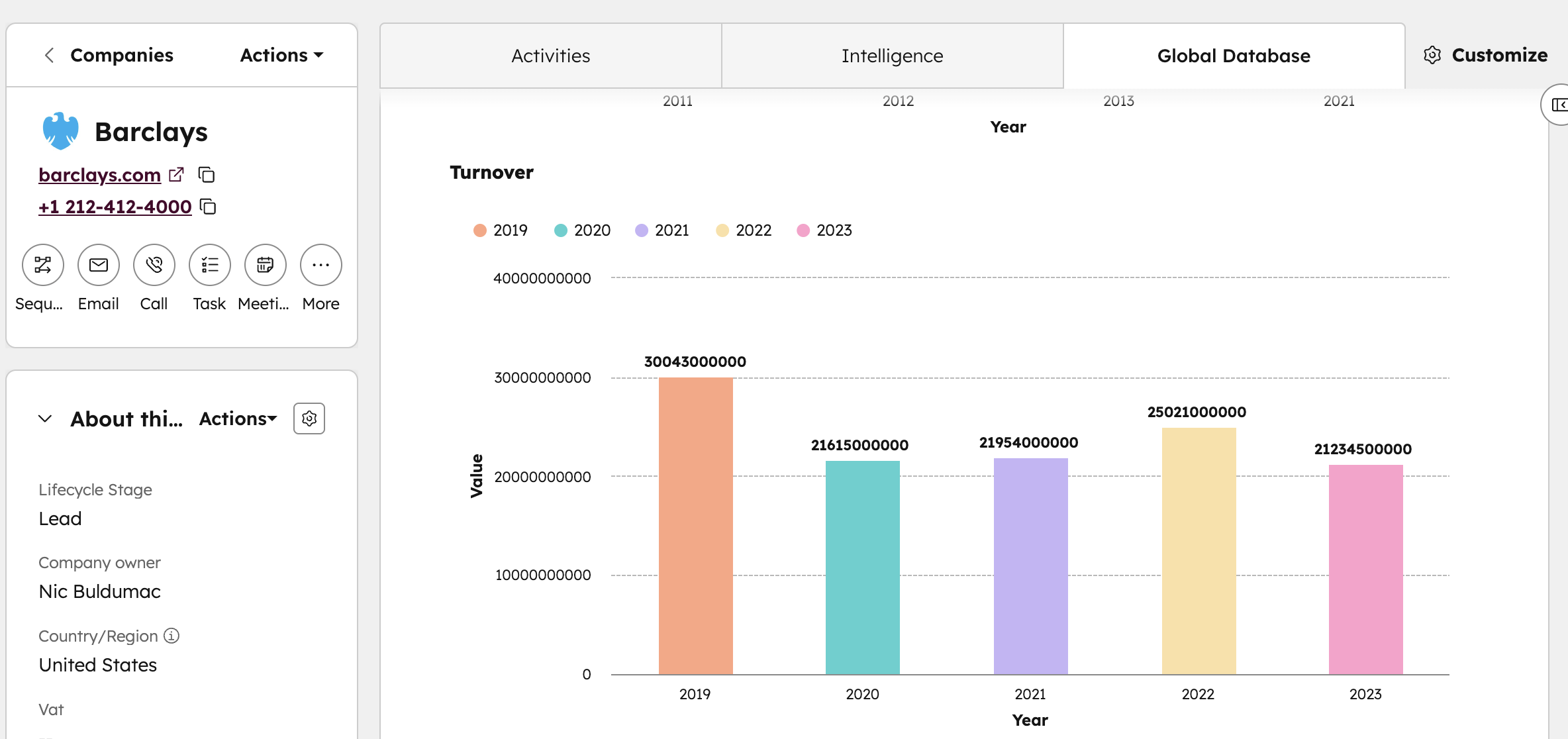
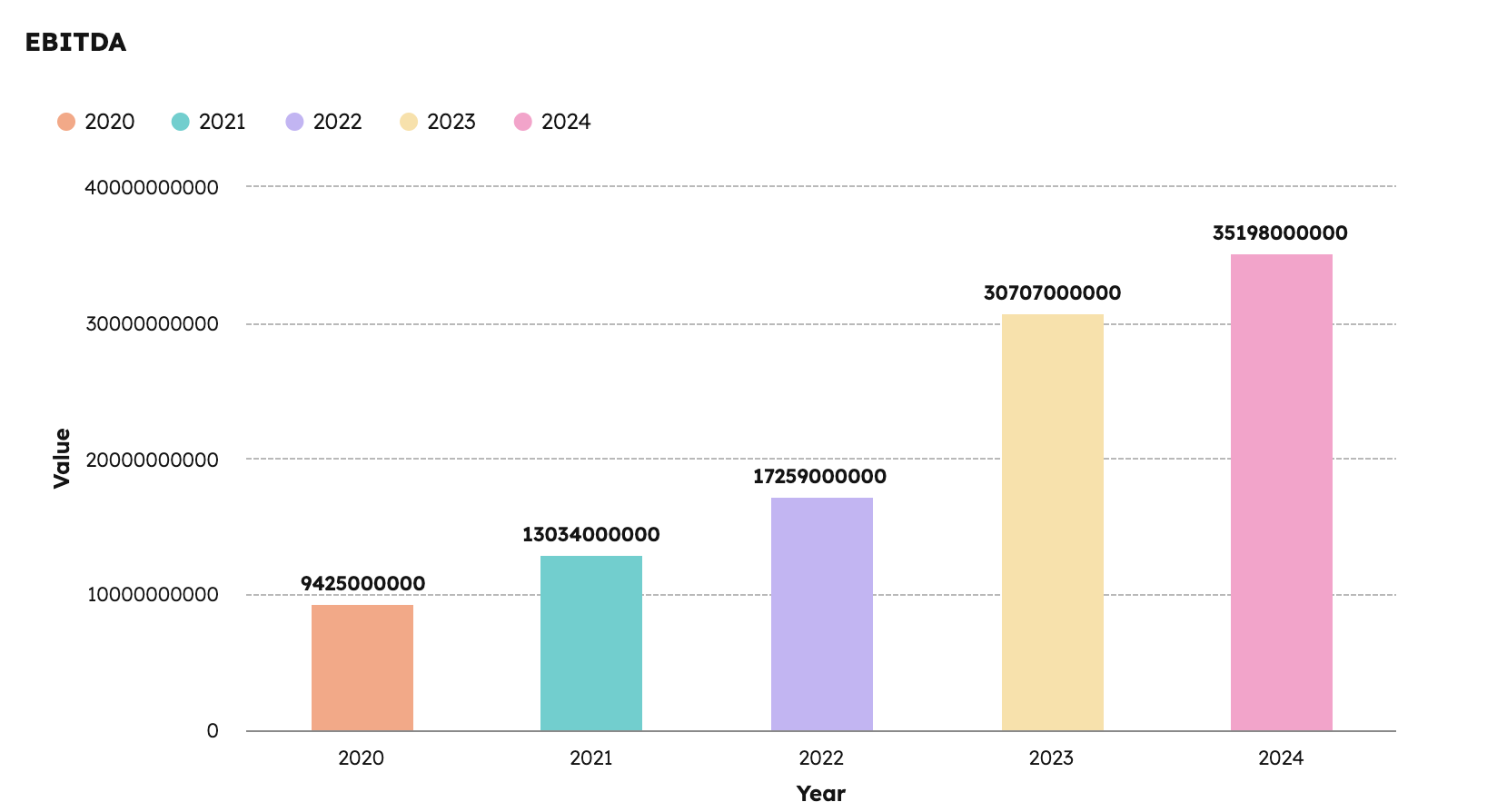 Teams get access to official filings (in countries where available):
revenue
profit & loss
balance sheet
assets & liabilities
filing years
This enables better deal scoring and customer-risk assessment.
 → Segmentation becomes precise and data-driven
For the first time, HubSpot can segment based on:
verified company size
real group structure
activity status
financial strength
ownership type
Marketing becomes significantly more efficient.
→ Compliance gets a built-in KYB layer
Compliance and risk teams can verify:
company legitimacy
legal status
ownership
UBOs
shareholders
group structure
Without leaving the CRM.
2.4 Why This Before/After Transformation Matters
Because HubSpot is often the central system for:
sales
marketing
customer success
onboarding
compliance
revenue operations
— the quality of company data directly impacts the performance of every team.
Enrichment doesn’t add “more data.”
It corrects what you already have, fills gaps, and gives your CRM verified business identity, which informs every decision your teams make.
3. Practical Use Cases That Deliver Real Value
Enriching your HubSpot CRM with official registry data doesn’t just add information—it fundamentally changes how your teams work. Once enrichment is activated, HubSpot becomes more reliable, more actionable, and far more strategic. Below are the key use cases that organizations immediately benefit from.
3.1 Automatically Enrich Every New Lead Entering HubSpot
Every new company entering HubSpot—whether through forms, imports, integrations, or manual creation—can be enriched instantly.
This means no lead ever enters your CRM incomplete again.
With automatic enrichment enabled, your team can immediately see:
whether the company is legitimate
whether it is active or inactive
whether it is part of a larger group
whether its profile is worth prioritizing
This removes the guesswork from qualification and gives sales and marketing a complete view from the first touch.
Instead of researching companies manually, your CRM does the work for you.
3.2 Clean and Complete Your Existing Database
Most organizations carry years of messy CRM data—duplicates, inconsistent names, companies that no longer exist, or records created without proper checks.
Enrichment reveals and repairs this automatically by:
completing missing fields
aligning company names with their official registry versions
standardizing formats across countries
flagging dissolved or inactive companies
exposing questionable or manually created entries
Your CRM becomes cleaner, more trustworthy, and easier to manage.
RevOps finally gets the visibility needed to enforce data hygiene.
3.3 Receive Alerts When Company Information Changes
Companies evolve constantly. Financials get updated, subsidiaries change, new owners appear, and companies cease operations. Relying on static CRM data means you're always reacting too late.
With enrichment alerts, HubSpot notifies you when important changes occur, such as:
new financial filings
changes in ownership or UBOs
new branches or subsidiaries
a company becoming inactive or dissolved
This helps teams act proactively instead of retroactively:
Sales avoids chasing companies that are no longer active
Compliance can reassess partners when ownership changes
Customer success can monitor financial deterioration in key accounts
Your CRM stays aligned with the real world—not a snapshot from months ago.
3.4 Identify Upsell and Expansion Opportunities Through Group Structure
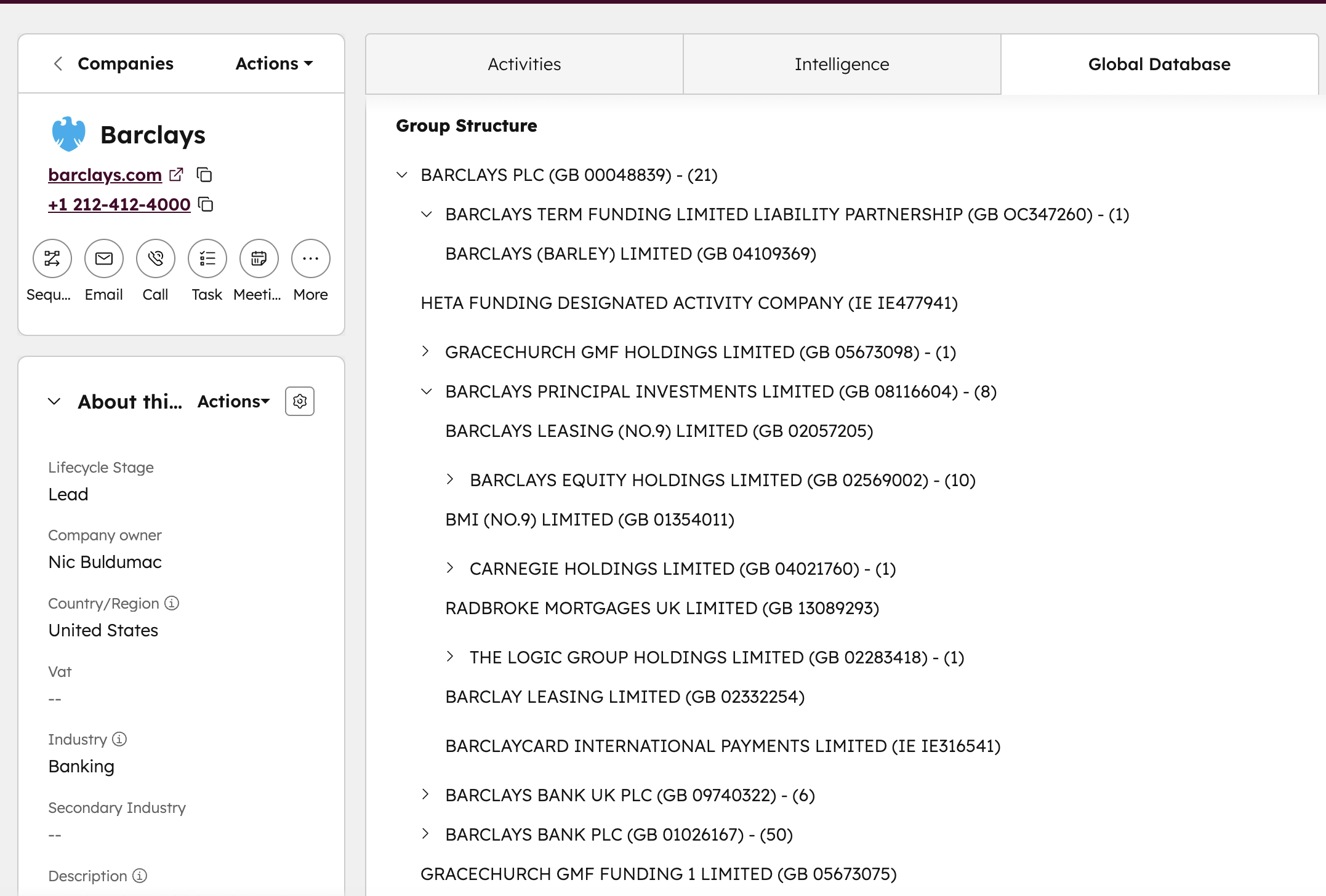 One of the most powerful outcomes of enrichment is the visibility into corporate families. Many companies operate under large groups, but HubSpot typically only stores the single entity your team interacted with.
Once enriched, you can suddenly see:
the parent company behind a lead
subsidiaries you weren’t aware of
sister companies operating in other countries
cross-border entities that share the same ownership
This opens the door to:
coordinated enterprise selling
multi-entity account strategies
regional and global upsell opportunities
understanding where the real decision-makers sit
You stop selling to isolated branches and start engaging entire corporate groups.
3.5 Strengthen Compliance and Reduce Onboarding Risk
 For teams handling suppliers, partners, or clients across multiple regions, enriched data brings clarity and protection.
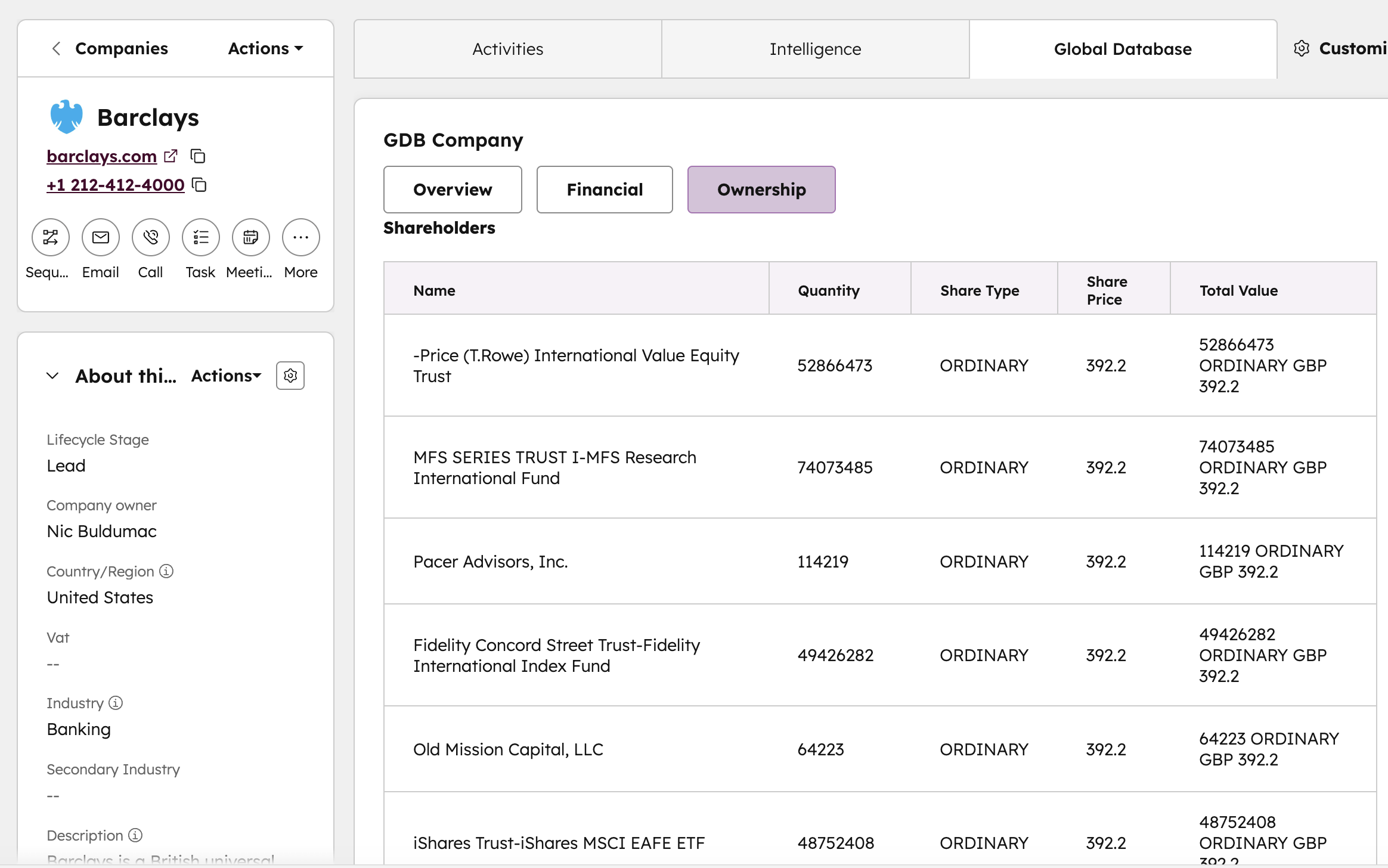
With registry-verified information inside HubSpot, compliance teams can:
confirm the company truly exists
validate its legal status
identify UBOs (Ultimate Beneficial Owners)
detect ownership changes that require review
avoid onboarding dissolved or high-risk entities
This makes HubSpot a more dependable tool for risk and onboarding workflows, reducing reliance on external checks and manual document reviews.
3.6 Improve Lead Scoring, ICP Targeting, and Segmentation
With enriched profiles, HubSpot gains the structure needed to build segments that actually reflect your ideal customer profile.
Teams can create lists or scoring rules based on factors such as:
company maturity
group membership
legal status
size, structure, or financial strength
recent changes or filings
This leads to:
more accurate targeting
higher conversion rates
fewer wasted outreach attempts
better alignment between sales and marketing
Your CRM becomes a powerful segmentation engine driven by real, official data.
3.7 Ensure Every Team Works From One Trusted Source
Finally, enrichment solves a major organizational challenge: different teams working with different versions of the truth.
With registry-sourced data inside HubSpot:
Sales sees the real structure behind prospects
Marketing targets based on verified criteria
RevOps controls accuracy and consistency
Compliance runs checks without external tools
CS understands the stability and context of every account
Everyone relies on the same authoritative source—HubSpot becomes the single place where company truth lives.
4. Real HubSpot Workflows You Can Build After Enrichment
Once HubSpot is enriched with verified registry data, your CRM becomes more than a storage system — it becomes an automation engine powered by real company intelligence.
With accurate registration details, ownership, group structure, financial indicators, and contact data now available, you can build workflows that were previously impossible.
Below are real examples of high-impact workflows used by sales, marketing, RevOps, CS, and compliance teams.
4.1 Route High-Value Leads to Senior Reps Automatically
When enrichment populates financials, size, group structure, or industry:
Trigger:
→ “Company revenue is above X”
→ “Company employee count is above X”
→ “Company belongs to a large corporate group”
Action:
→ Assign to senior SDR or enterprise AE
→ Increase lead score
→ Trigger an immediate outreach sequence
Why it matters:
Big accounts don’t get lost in the general queue.
4.2 Block Unqualified or Risky Leads Immediately
Using verified registry status and activity fields:
Trigger:
→ “Company status = inactive / dissolved / suspended / liquidated”
Action:
→ Mark as unqualified
→ Notify RevOps or Sales Manager
→ Remove from nurture sequences
Why it matters:
Your team never wastes time on companies that legally no longer exist.
4.3 Enhance Lead Scoring With Verified Firmographics
Instead of scoring leads based on self-reported data, you score them based on verified attributes:
Triggers (examples):
Industry matches your ICP
Ownership type = Private / Public
Company age > X years
Group structure includes more than X subsidiaries
Financial stability indicators are strong
Actions:
Assign higher lead score
Move to a more aggressive nurturing path
Create tasks for SDRs
Why it matters:
Lead scoring becomes factual, not subjective.
4.4 Trigger Alerts When Ownership or UBOs Change
Ownership updates are critical for:
compliance teams
legal teams
enterprise sales
account managers
Trigger:
→ “Ownership or UBO changed”
→ “Shareholding structure updated”
Action:
→ Notify compliance
→ Create a task for AM/AE
→ Pause onboarding if necessary
Why it matters:
You can react to structural changes instantly — which is essential in regulated industries.
4.5 Notify Sales When a Subsidiary Belongs to an Existing Customer Group
Group structure enrichment unlocks advanced cross-sell workflows:
Trigger:
→ “Company’s parent is already a customer”
→ “Subsidiary added to an existing group”
Action:
→ Notify account owner
→ Add company to expansion pipeline
→ Trigger a strategic outreach sequence
Why it matters:
You instantly spot expansion opportunities across a corporate family.
4.6 Prioritize Companies Filing New Financial Statements
Financial filings often indicate:
business growth
new investments
shifts in leadership
changes in creditworthiness
Trigger:
→ “New financials filed”
Action:
→ Notify AE/CS
→ Update internal risk score
→ Trigger a renewal or upsell review
Why it matters:
Your team stays ahead of client trends, not behind them.
4.7 Automatically Verify New Suppliers or Partners
Compliance-focused workflows help teams evaluate suppliers quickly:
Trigger:
→ “New company added with missing registry verification”
Action:
→ Run enrichment
→ Notify compliance if:
status ≠ active
UBO is unclear
financial warning signs appear
Why it matters:
Your supply chain and onboarding processes become safer and more consistent.
4.8 Detect Data Gaps and Prompt Users to Fix Them
You can create workflows that identify and repair low-quality entries:
Trigger:
→ “Company without registration number”
→ “Company missing industry classification”
→ “Company missing key contact info”
Action:
→ Auto-enrich the record
→ Assign tasks to SDRs
→ Notify RevOps of data inconsistencies
Why it matters:
CRM hygiene becomes predictable and ongoing — not a quarterly crisis.
4.9 Segment and Nurture Leads Based on Verified Industry and Size
Marketing can finally run campaigns based on reality, not guesses.
Trigger:
→ “Industry matches ICP”
→ “Company size is within target range”
→ “Verified group-size > X entities”
Action:
→ Add to tailored nurture sequences
→ Personalize messaging
→ Align content with segment needs
Why it matters:
Marketing stops wasting spend on companies that will never buy.
4.10 Trigger Renewal Risk Alerts in Customer Success
Enriched financial and ownership data helps CS anticipate issues.
Trigger:
→ “Client’s financials show revenue decline”
→ “Company changes ownership”
→ “Company becomes inactive”
Action:
→ Notify CS manager
→ Create retention playbook tasks
→ Escalate to leadership for review
Why it matters:
CS teams can intervene early — before churn happens.
5. Why These Use Cases Matter for Your Organisation
The real value of enriching HubSpot isn’t in the added data fields—it’s in the organisational advantages that come from working with accurate, complete, and trustworthy company information. When every record reflects what’s filed in official registries, teams operate with more precision, make faster decisions, and avoid costly blind spots.
Enriched data doesn’t just enhance HubSpot; it elevates how your entire organisation functions.
5.1 Sales Teams Stop Guessing and Start Prioritizing Correctly
Sales reps spend countless hours researching companies, validating data, and contacting leads that never should have been in the pipeline. With enriched company profiles, they immediately know:
whether a company is legitimate and active
whether it has real stability and buying potential
whether they should be selling to a parent company, not a subsidiary
whether the record is a duplicate of another account
This allows sales teams to focus exclusively on viable opportunities, shorten qualification time, and improve forecast accuracy.
5.2 Marketing Gains the Accuracy Needed for Meaningful Segmentation
Marketing’s performance depends on the quality of the database.
Enriched records give marketing teams the structure needed to segment audiences confidently and target campaigns with precision.
With registry-backed data inside HubSpot, marketing can:
target only active and relevant companies
build segments based on real business attributes
match campaigns to the right size and industry
avoid spending budget on invalid or low-quality accounts
The result is higher engagement and a far stronger alignment with sales.
5.3 RevOps Can Finally Maintain a Clean and Consistent CRM
Maintaining data hygiene is nearly impossible when companies appear under multiple names, or when fields are missing, inconsistent, or outdated. Enrichment gives RevOps the clarity required to keep HubSpot organised at scale.
They can:
identify and merge duplicates confidently
standardise naming and legal classification
remove non-existent or dissolved entities
maintain accurate dashboards and reporting
A stable CRM creates a stable business.
5.4 Compliance and Risk Functions Gain Reliable Visibility
For organisations working with suppliers, clients, or partners, verifying company legitimacy is non-negotiable. Registry-sourced enrichment gives compliance teams:
real-time confirmation that a company exists
insight into legal status and activity
visibility into ownership and control
early warning indicators for structural or legal changes
Instead of relying on screenshots, PDFs, or inconsistent external sources, HubSpot becomes a single environment where due diligence begins.
5.5 Customer Success Teams Understand Accounts in Their Full Context
Retention depends on understanding the companies behind your customers.
With enriched profiles, customer success teams gain clarity into:
group structures behind key accounts
changes in financial stability
recent ownership transitions
potential consolidation opportunities
This allows CS teams to anticipate risks, guide renewals more effectively, and uncover expansion opportunities already within your customer base.
5.6 Leadership Gains a More Accurate View of the Entire Customer Landscape
At an executive level, enriched data transforms HubSpot into a strategic decision-making system.
Leadership can clearly see:
which industries are performing
which markets show the highest potential
where risk is concentrated
how deeply the organisation penetrates corporate groups
where expansion opportunities exist across regions or sectors
It shifts decision-making from intuition to insight—powered by verified data.
6. How to Install the App in HubSpot
Installing the Global Database Intelligence Enrichment app is straightforward. You don’t need a developer, a technical team, or any special configuration. HubSpot handles the entire process for you, and within minutes your CRM begins receiving verified company intelligence directly from official registries.
Here’s how the installation works in practice.
6.1 Find the App in HubSpot
Start by opening the HubSpot App Marketplace.
Search for “Global Database Intelligence Enrichment” and open the listing.
Or, click on the following link - https://ecosystem.hubspot.com/marketplace/listing/global-database-intelligence-enrichment
This page gives you an overview of the app, screenshots of how enrichment appears inside HubSpot, and a description of the features you’ll unlock.
The app is free to install, so you can proceed without entering any payment details.
6.2 Connect HubSpot With Global Database
When you click Install, HubSpot will ask you to confirm that you want to connect the integration to your portal.
Once approved, you’ll be redirected to create or log into your Global Database account.
This account activates your free enrichment allowance and tells HubSpot where the verified registry data should come from.
6.3 Choose How You Want Enrichment to Work
After the connection is made, you set your preferred enrichment mode. Most teams choose one of three approaches:
Automatic enrichment — new companies entering HubSpot enrich instantly.
On-demand enrichment — you enrich records only when you open them.
Bulk enrichment — you clean and update large groups of existing records.
There is no “wrong choice”; you can switch modes at any time depending on your workflow.
6.4 See the New Panels Inside HubSpot
Once the integration is active, open any company record in HubSpot.
You’ll notice new sections in the right-hand sidebar that didn’t exist before.
These panels show verified information such as registry details, ownership, shareholders, group structure, and financial data (where available).
This information doesn’t overwrite your existing HubSpot fields unless you choose to map it.
6.5 Your First Enrichment Happens Instantly
As soon as you open a company and click the Enrich button, the record updates in seconds.
This first enrichment confirms everything is working properly and gives you a preview of the insights the app can deliver across your entire CRM.
6.6 You Now Have 1,000 Free Enrichments to Use
Every HubSpot portal gets 1,000 free company enrichments.
You can:
enrich new leads as they enter the CRM,
clean existing accounts,
verify partners or suppliers,
or enrich your entire pipeline.
And once a record is enriched, it continues receiving updates for free — ownership changes, financial filings, status changes, new subsidiaries, and more.
6.7 Your CRM Is Now Connected to 195+ Official Registries
With the app installed, HubSpot transforms from a contact database into a source of verified business truth.
Every part of your organization — sales, marketing, RevOps, compliance, and CS — now works with real registry data directly inside the CRM.
7. Why Global Database Is Unique Compared to Other HubSpot Enrichment Apps
Instead of focusing on the specific fields we enrich (already covered in earlier sections), this section explains the deeper structural differences in how Global Database collects, maintains, and validates data — and why this creates a higher level of reliability inside HubSpot.
No repeated feature lists.
No repeated data attributes.
Just the unique parts of our system architecture and sourcing model.
7.1 A Single Global Data Pipeline Across 100+ Registries
Most enrichment providers pull data from many unrelated sources.
Global Database operates a single unified pipeline, meaning:
every country follows the same normalization rules
identifiers are mapped consistently
updates follow a coordinated schedule
cross-border companies are linked correctly
legal entities are structured the same way globally
This matters because it prevents the fragmentation that often appears in CRMs when data comes from inconsistent sources.
7.2 A Standardized Global Schema (Built for CRMs)
Global Database does not simply pass raw registry information into HubSpot.
Instead, we maintain a global schema, designed specifically for:
CRM compatibility
uniform field naming
consistent formatting
cross-country comparisons
API compatibility
long-term data hygiene
This allows HubSpot users to work with data from 150+ countries as if it all came from one system.
No other HubSpot enrichment provider invests in global standardization at this scale.
7.3 Cross-Registry Matching: We Link Companies That Belong Together
A unique advantage of Global Database is our ability to follow a company across borders.
Many companies operate using:
multiple legal entities
multiple registrations
multiple subsidiaries
different legal names in different jurisdictions
Global Database uses internal mapping systems that track:
local identifiers
historical identifiers
mergers & re-registrations
reorganizations
jurisdiction changes
This allows us to accurately connect entities across countries and build a consolidated global profile.
7.4 A Controlled, First-Party Update Cycle
We do not rely on external update feeds or third-party refresh schedules.
All updates follow our own controlled process:
collection from registry
transformation with our internal rules
normalization
validation workflows
consistency checks
version tracing
This ensures:
nothing enters HubSpot without verification
every change is logged
every historical version can be traced
This creates a more stable CRM over time.
7.5 Country-Level Expertise — Not a Generic Global Dataset
Each country has its own:
laws
registry structure
reporting formats
legal identifiers
filing requirements
update cycles
Global Database has country-specific pipelines that adapt to these differences, instead of one generic global workflow.
This results in:
better coverage
more accurate local identifiers
correct interpretation of legal statuses
reliable mapping of local filing terms
It’s the equivalent of having a dedicated local data team for every country — but inside one platform.
Conclusion
A CRM is only as strong as the data inside it. When company records are incomplete, inconsistent, or unverified, every team feels the impact—sales, marketing, RevOps, compliance, and customer success.
By enriching HubSpot with data sourced directly from official registries, Global Database helps teams work with information they can rely on. Verified identifiers, accurate company details, financial filings, ownership insights, and group structures give your CRM a level of clarity that’s hard to achieve through manual updates or traditional enrichment tools.
The best part? You can start enriching up to 1,000 companies for free.
No disruption to your workflows. No complicated setup. Just cleaner, more accurate data flowing into HubSpot automatically.
If your goal is to improve data quality, strengthen account intelligence, and give your team a single source of truth, this integration makes it easy to get there. With better information, HubSpot becomes not just a CRM—but a more precise and dependable foundation for your entire revenue operation.
Frequently Asked Questions (FAQ)
What is the Global Database HubSpot Enrichment App?
The Global Database Enrichment App is a HubSpot integration that automatically updates company records using official registry-sourced data, including legal identifiers, ownership, group structure, and financial filings. It helps improve CRM accuracy, lead qualification, and workflow automation.Is there a free HubSpot enrichment tool from Global Database?
Yes. Global Database offers one of the only free HubSpot enrichment solutions, allowing you to enrich up to 1,000 company records at no cost. This includes verified company identity, registration numbers, activity status, and more.How does HubSpot company enrichment work with Global Database?
Once installed, the app automatically identifies each company in HubSpot using its official registry profile and enriches the record with verified information. This includes legal details, identifiers, industry classification, ownership, and—when available—financial statements.What data sources does Global Database use for HubSpot enrichment?
Enrichment is powered by official government registries, corporate filings, tax authorities, and national business registration systems across 100+ countries. No approximations or crowd-sourced information—only first-party, authoritative data.Can Global Database help clean and deduplicate HubSpot company records?
Yes. Because each record is enriched with a registration number, VAT/EIN, and other legal identifiers, HubSpot can accurately detect and merge duplicates. This is one of the fastest ways to improve long-term CRM data quality.Does the Global Database app enrich HubSpot with financial data?
Yes. Where available, the app adds official financial filings such as revenue, assets, liabilities, balance sheets, and historical financial statements. This data helps sales and RevOps teams score accounts more accurately.Does the app show corporate group structure in HubSpot?
Absolutely. Global Database adds verified information about parent companies, subsidiaries, and ultimate controlling entities. This helps identify cross-sell opportunities, align enterprise accounts, and avoid fragmented records.Can I enrich existing HubSpot records or only new ones?
You can do both.
Automatic enrichment updates every new company added to HubSpot.
Bulk enrichment refreshes your existing database, fixing incomplete or outdated entries.How does the enrichment improve HubSpot workflows and automation?
With verified data, you can build more accurate workflows, such as:
routing high-value companies to specific sales reps
triggering alerts when ownership or legal status changes
improving lead scoring with real company attributes
segmenting based on industry, size, or financial strength
It makes HubSpot automation more reliable and data-driven.
How long does it take to set up the Global Database HubSpot integration?
The setup typically takes 5–10 minutes. Once installed, enrichment begins automatically, bringing verified company data into HubSpot without manual intervention or custom configuration.
What is the best HubSpot enrichment tool for verified company data?
Global Database is one of the only HubSpot enrichment tools that uses official government registry data, giving users legally accurate company profiles, ownership details, and financial records—not estimated or assumed information.How can I validate company information automatically inside HubSpot?
You can validate company identity in HubSpot by installing the Global Database app, which automatically adds registration numbers, VAT/EIN, legal names, and activity status directly from national registries, ensuring every record is correct and up-to-date.How do I get financial data for companies directly inside HubSpot?
With Global Database, HubSpot users can access official financial filings, including revenue, profit & loss, and balance sheets, where legally available. This helps sales, RevOps, and risk teams qualify accounts using real financial information.Is there a HubSpot integration that shows ultimate beneficial owners (UBOs)?
Yes. Global Database enriches HubSpot records with shareholders, ownership percentages, indirect owners, and UBOs, making it a powerful tool for compliance, supplier onboarding, and enterprise sales.How can I clean and standardize company data in HubSpot CRM?
The Global Database app enriches companies with verified legal identifiers and standardized attributes, enabling HubSpot to detect and merge duplicates, correct naming discrepancies, and maintain consistent company profiles across regions.Can I use HubSpot for KYB or business verification?
Yes. Global Database brings Know Your Business (KYB) capabilities directly into HubSpot by providing real registration data, legal status, ownership structure, and identity verification—all sourced from official registries.How do I track changes to company information in HubSpot automatically?
With Global Database, you can set up workflows to alert you when a company’s status, ownership, group structure, or filings change. This is essential for risk management, renewals, and enterprise account coverage.How do I identify parent companies and subsidiaries inside HubSpot?
Global Database automatically enriches records with verified group structure, allowing you to view parent entities, subsidiaries, and ultimate controlling companies. This helps sales teams map complex accounts and spot expansion opportunities.Is there a free way to improve data quality in HubSpot CRM?
Yes. Global Database offers free enrichment for up to 1,000 companies, giving you a cost-free way to clean your CRM, add verified details, fix duplicates, and improve segmentation accuracy.How do I segment HubSpot companies more accurately for B2B targeting?
By enriching records with verified industry codes, company size, financial indicators, and activity status, Global Database allows you to build precise HubSpot segments that match your ideal customer profile (ICP) across any market.